

Important: Weeb Pakistan is an independent news website, not a government website. Confirm details on the official website or helpline of the program. Never share your CNIC, PIN or OTP with anyone, and never pay anyone to receive a government payment. Report an error.
NADRA Introduces Automated Machines
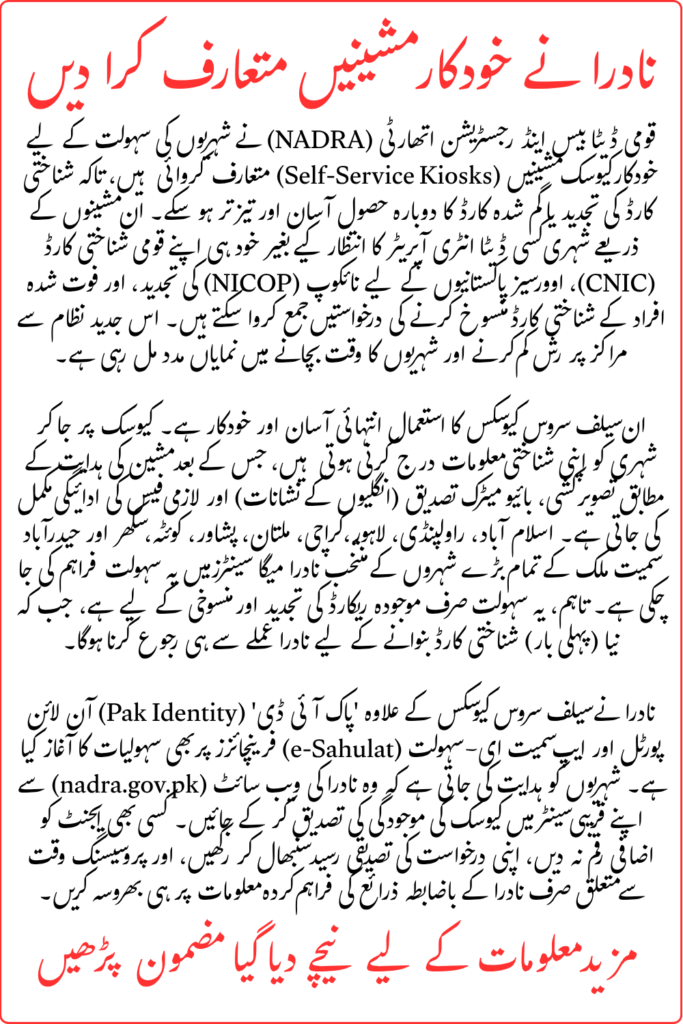
Getting a National Identity Card renewed or replaced can take time, especially when citizens have to travel to a registration centre and wait for their turn. To make identity services more convenient, the National Database and Registration Authority (NADRA) has introduced self-service kiosks that allow people to complete certain identity-document applications themselves.
In 2026, NADRA’s self-service kiosk service is available at selected centres in several Pakistani cities. These machines can help eligible applicants apply for CNIC or NICOP renewal, replacement of lost or damaged cards, and certain other services.
Applicants can enter their information, complete the required verification steps, and submit an application without relying on a data-entry operator for every step. However, an application must still pass the required checks and approval process before the document is issued.
What Are NADRA Self-Service Machines?
NADRA self-service machines, also known as self-service kiosks, are designed to help citizens complete selected identity-document applications independently. They provide an alternative to the conventional process of having every application entered by a staff member.
The kiosks guide applicants through the relevant stages, which may include entering existing identity-card details, capturing a photograph, completing biometric verification, selecting a processing option, and making the prescribed payment. The exact services available depend on the kiosk and the instructions displayed during the application.
NADRA has also introduced other digital services, including its Pak Identity online platform and mobile application. These services are separate from the physical self-service kiosks, so applicants should choose the method appropriate for their particular identity-document request.
Also Read: 8171 Tracking Portal Restoration and BISP Payment Check
NADRA Automated Machines Latest Update 2026
NADRA’s official self-service kiosk announcement in July 2026 listed locations across Islamabad, Rawalpindi, Punjab, Karachi, Hyderabad, Sukkur, Quetta and Peshawar. This means the service is no longer described accurately by saying that it is only planned for Karachi.
The available services and locations may change as NADRA expands or adjusts its facilities. Before travelling, check the latest information from NADRA’s official website or its official announcements to confirm whether your nearest centre has a kiosk and can handle your application type.
| Detail | Information |
|---|---|
| Service | NADRA self-service kiosks |
| Main purpose | Complete selected identity-document applications |
| Available services | Selected renewal, replacement and cancellation applications |
| Processing | Subject to verification and approval |
| Fees | Prescribed NADRA fee for the selected service |
| Official website | nadra.gov.pk |
| Online service | Pak Identity |
Which Services Can You Access Through NADRA Kiosks?
The available services depend on the facility and the type of identity document. NADRA’s official kiosk announcement describes several application categories that citizens can process through these machines.
CNIC Renewal
If your Computerised National Identity Card has expired or needs renewal, a kiosk may allow you to submit the renewal application. You will need to provide the requested identity information and complete the verification steps displayed by the machine.
Before starting, check the application details carefully. If your record requires a correction or additional verification, you may need assistance from NADRA staff.
Replacement of a Lost or Damaged Card
Citizens who have lost or damaged an existing CNIC may be able to submit a replacement application through an available kiosk. The machine guides the applicant through the relevant steps, but the application remains subject to NADRA’s checks and approval.
If you are unsure which replacement option applies to your situation, consult the official service instructions before submitting the request.
NICOP Renewal or Replacement
Some NADRA kiosks also support applications relating to the National Identity Card for Overseas Pakistanis (NICOP). The available options may include renewal or replacement for a lost or damaged card, depending on the kiosk and its supported services.
Check the options at your selected centre before travelling, particularly if your application concerns an overseas identity document.
Cancellation of a Deceased Person’s CNIC or NICOP
NADRA’s official kiosk guidance also includes applications to cancel the CNIC or NICOP of a deceased family member. Applicants should follow the displayed instructions and provide the information or documentation requested for the cancellation process.
Not every kiosk necessarily offers every service, so confirm availability before starting.
Also Read: Chief Minister Punjab Minority Card 2026 Complete Online Registration Guide
How to Apply for an ID Card Through a NADRA Self-Service Kiosk
The kiosk is designed to guide applicants through the application process. The exact screens and requirements can differ according to the service selected.
Step 1: Visit a Centre With a Self-Service Kiosk
First, confirm that the NADRA centre you plan to visit has a working self-service kiosk and supports your required service. Do not assume that every NADRA registration centre has the same facilities.
You can use NADRA’s official website to find service information and check official announcements before travelling.
Step 2: Select the Required Service
Choose the relevant option on the kiosk, such as renewal or replacement of an existing card. If you need a service that is not listed, ask NADRA staff for guidance rather than selecting an unrelated option.
Step 3: Enter Your Existing Identity Details
Follow the on-screen instructions to enter the information requested by the system. Check your identity-card number and other details carefully before continuing.
If the machine cannot retrieve your information or indicates that further assistance is required, contact the designated staff member.
Step 4: Complete Photograph and Biometric Verification
Depending on the application, the kiosk may ask you to capture a photograph and complete biometric verification. Follow the instructions shown on the screen and make sure the required steps are completed successfully.
Some applications may require further checks or approval from a NADRA officer.
Step 5: Select the Available Processing Option
If the service offers different processing categories, choose the one that meets your needs. Read the applicable fee and processing information before confirming your selection.
Do not assume that urgent processing is available for every document or at every kiosk.
Step 6: Pay the Prescribed Fee
Complete payment using the method accepted for your application. The payment instructions may differ by service and location, so follow the options shown by the kiosk or provided by NADRA staff.
Keep the payment receipt or application reference for future tracking.
Step 7: Complete Submission and Track Your Application
Follow the remaining instructions and make sure the application has been submitted successfully. If the kiosk issues an application number or receipt, keep it safe.
Your document will be processed according to the applicable category and verification requirements. The self-service machine does not automatically approve an application or guarantee delivery within a fixed number of days.
Where Are NADRA Self-Service Kiosks Available in 2026?
NADRA’s official July 2026 announcement listed self-service kiosk locations in the following areas:
| City or area | Locations listed in the official announcement |
|---|---|
| Islamabad | Blue Area Mega Centre and Bhara Kahu Registration Centre |
| Rawalpindi | Murree Road Mega Centre, CSD Centre and Wah Cantt Centre |
| Lahore | Data Ganj Bakhsh, Egerton Road and PECO Road Mega Centres |
| Other Punjab cities | Gujranwala, Sialkot, Faisalabad, Jhang, Sargodha City, Multan City, Model Town Bahawalpur and Rahim Yar Khan |
| Karachi | DHA, North Nazimabad and Siemens Chowrangi Mega Centres |
| Hyderabad | Hyderabad Big Centre and Hyderabad East |
| Sukkur | Sukkur City Centre |
| Quetta | Quetta and Cantt centres |
| Peshawar | Ring Road Mega Centre |
Important: This is the list published in NADRA’s July 2026 announcement. Centre availability, kiosk operation and supported services can change. Confirm the latest details before making a journey.
Also Read: Complete Details of BISP Survey Registration Requirements For New Applicants In 2026
Does NADRA Deliver the Card Within 15 to 30 Days?
Earlier reports about the kiosk initiative mentioned delivery estimates for identity documents after application submission. However, applicants should not treat an old estimate of 15 to 30 days as a guaranteed delivery period for every application in 2026.
The actual processing time depends on the selected service, processing category, verification requirements and NADRA’s current procedures. Check the timeline displayed during your application or confirmed by NADRA staff. Keep your application receipt so you can follow up if the document does not arrive within the stated period.
NADRA e-Sahulat Service Is Another Option
In addition to self-service kiosks, NADRA has introduced a pilot for selected e-Sahulat franchises to improve access to certain identity services. The pilot was reported at selected locations in Islamabad, Rawalpindi, Lahore and Karachi.
Unlike a fully self-service kiosk, this arrangement includes a designated NADRA officer at participating locations. The reported pilot includes an additional service charge of Rs. 100 payable to the e-Sahulat franchise, in addition to the prescribed NADRA fee.
The service is limited to selected participating franchises during the pilot. Do not assume that every e-Sahulat shop can process NADRA identity documents. Check the official announcement and participating-location details before visiting.
Can You Apply for an ID Card Online Instead?
Yes, NADRA also offers online identity-document services through the Pak Identity platform. This is a separate option from visiting a self-service kiosk.
Visit Pak Identity to check the services available for your document type. Online application options and requirements can differ according to the applicant’s circumstances and the type of identity document being requested.
If your application involves a first-time CNIC, a complicated record correction or a case requiring in-person verification, check NADRA’s instructions to find out whether you need to visit a registration centre.
Also Read: BISP 2026 JazzCash Payment Start Now Check Full Process to Receive New Installment
Important Instructions Before Using a NADRA Kiosk
Before submitting an application, keep these points in mind:
- Confirm that the kiosk supports your required identity-document service.
- Carry your existing identity-card details and any documents requested for your application.
- Enter your personal information carefully.
- Complete the biometric and photograph steps according to the instructions.
- Check the fee and processing category before payment.
- Keep your receipt and application reference number.
- Ask authorised NADRA staff for help if the machine displays an error.
- Use official NADRA websites and announcements for updates.
The self-service system is intended to make selected applications more convenient, but it does not remove the need for accurate information, verification or official approval.
Also Read: BISP Kafalat Enrollment Reopens 2026 Check Eligibility
FAQs
What are NADRA automated machines?
They are self-service kiosks that allow citizens to complete selected identity-document applications, including certain renewal, replacement and cancellation requests.
Are NADRA self-service kiosks available in 2026?
Yes. NADRA’s official July 2026 announcement lists kiosks at selected centres in several cities, including Islamabad, Lahore, Karachi, Multan, Bahawalpur and other locations.
Can I get a new CNIC through a self-service kiosk?
The official kiosk guidance highlights selected services such as renewal, replacement and cancellation. Do not assume that first-time CNIC registration is available at every kiosk. Check NADRA’s current service instructions for your case.
Can I apply for a lost or damaged ID card through a kiosk?
NADRA’s official guidance includes replacement applications for lost or damaged cards at supported kiosks. Confirm that your chosen centre offers the relevant service.
How long does NADRA take to deliver an ID card?
Processing time depends on the service, selected category and verification requirements. Check the timeline provided during the application process rather than relying on an old estimate.
Can I pay the fee at a NADRA kiosk?
The kiosk provides payment instructions for the selected service. Follow the accepted payment method shown by the machine or confirmed by NADRA staff.
Is the e-Sahulat service the same as a self-service kiosk?
No. The reported e-Sahulat pilot operates through selected franchises with a designated NADRA officer and an additional service charge. A self-service kiosk is a separate facility.
Conclusion
NADRA’s self-service kiosks are an important step toward making selected identity-document applications more convenient for citizens. In 2026, the service is available at listed centres in several Pakistani cities, allowing eligible applicants to submit certain renewal, replacement and cancellation requests without relying on a data-entry operator for every step.
Before visiting, confirm the kiosk’s location, supported services, fee and processing requirements through official NADRA information. Keep your application receipt and follow the stated tracking process. If your case requires additional verification or the kiosk does not support your request, contact NADRA staff or use the official Pak Identity platform where applicable.